 vyuh
vyuh Diagram
Frames and groups
Frame
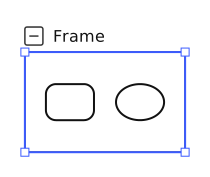
A frame is a painted container. Its children remain independently selectable and editable. Moving the frame moves the subtree; resizing it changes only the frame boundary, preserving child sizes and positions. The standard definition disables rotation. A custom frame definition can explicitly enable it.
The title sits above the top edge. For a collapsible frame, the collapse icon aligns with the frame's left edge and the title follows it. A non-collapsible definition can align its title directly to that edge. Double-click the title region to edit it; double-clicking the frame body must not capture the title editor.
The inspector exposes clipping where the definition supports it. Collapsing a frame preserves the expanded geometry and presents its collapsed registration; collapsed frames do not expose resize/rotation handles. See frames and ownership.
Group
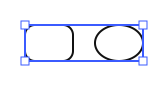
A group is a logical owner with no painted rectangle, title or connection ports. Moving and rotating a group carry its children. Resizing scales their geometry together, including any nested frame. This is intentionally different from resizing a frame boundary.
Shared ownership rules
Children have stable identities and one owner. Parent transforms and clipping are resolved once and shared by rendering, hit testing and export. Host APIs and pointer gestures use the same containment and transform policies. See ownership and shape behavior.